Add copy/paste params values functionality to a third-party element
(Available from WPBakery Page Builder 9.1)
The additional settings menu of the edit element modal lets users copy parameter values from one element and paste them into another. Only parameters marked with the copy-paste-value setting take part in this process. This tutorial shows how to enable it for elements added by a third-party plugin or theme, and how to customize the menu labels with a filter.
How it works
- Each parameter has an optional
copy-paste-valuesetting (Boolean, defaultfalse). - When set to
true, the parameter value is included when users copy and paste design options from the additional settings menu in the element editing window. These titles can be changed with thewpb_edit_element_additional_settings_menu_titlesfilter (see Customize the menu labels with a filter (optional)).
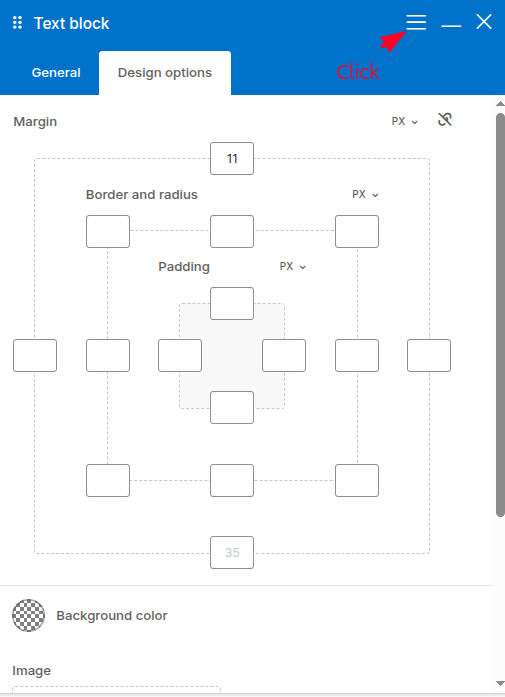
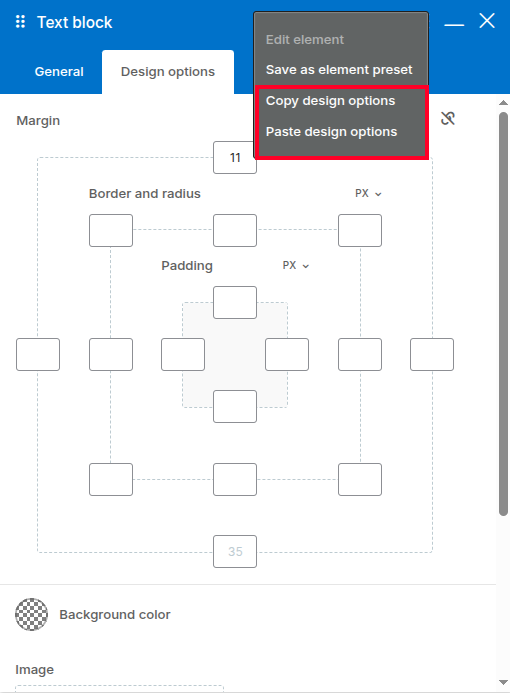
Example 1. Enable copy/paste for design options with a custom element
To let users copy and paste design options of your custom element, add 'copy-paste-value' => true to the css_editor param.
<?php
add_action( 'vc_before_init', 'my_plugin_map_bartag' );

function my_plugin_map_bartag() {
    vc_map( [
        'name'   => __( 'Bar tag', 'my-text-domain' ),
        'base'   => 'bartag',
        'params' => [
            [
                'type'       => 'colorpicker',
                'heading'    => __( 'Text color', 'my-text-domain' ),
                'param_name' => 'text_color',
            ],
            [
                'type'             => 'css_editor',
                'heading'          => __( 'CSS', 'my-text-domain' ),
                'param_name'       => 'css',
                'group'            => __( 'Design options', 'my-text-domain' ),
                'copy-paste-value' => true,
            ],
        ],
    ] );
}
You can also use the design options predefined by the plugin. Merge them into your params with the vc_config()->merge_default_params() method, as it is done in the configuration files of the built-in elements (vc_config() is available from WPBakery Page Builder 9.0). Copy this code to your theme's functions.php or to your plugin to try it:
<?php
add_action( 'vc_before_init', 'my_plugin_map_bartag_with_default_params' );

function my_plugin_map_bartag_with_default_params() {
    $params = [
        [
            'type'       => 'colorpicker',
            'heading'    => esc_html__( 'Text color', 'my-text-domain' ),
            'param_name' => 'text_color',
        ],
    ];

    vc_map( [
        'name'   => esc_html__( 'Bar tag', 'my-text-domain' ),
        'base'   => 'bartag',
        'params' => vc_config()->merge_default_params( $params ),
    ] );
}
Example 2. Enable copy/paste for your custom element params
Add 'copy-paste-value' => true to every parameter that should be copied.
<?php
add_action( 'vc_before_init', 'my_plugin_map_testimonial' );

function my_plugin_map_testimonial() {
    vc_map( [
        'name'     => __( 'Testimonial', 'my-text-domain' ),
        'base'     => 'my_plugin_testimonial',
        'category' => __( 'Content', 'my-text-domain' ),
        'params'   => [
            [
                'type'             => 'textfield',
                'heading'          => __( 'Author', 'my-text-domain' ),
                'param_name'       => 'author',
                // Copied and pasted together with other marked params.
                'copy-paste-value' => true,
            ],
            [
                'type'             => 'colorpicker',
                'heading'          => __( 'Text color', 'my-text-domain' ),
                'param_name'       => 'text_color',
                'copy-paste-value' => true,
            ],
            [
                'type'       => 'textarea',
                'heading'    => __( 'Quote', 'my-text-domain' ),
                'param_name' => 'quote',
                // Not copied: the quote is unique for each element.
            ],
        ],
    ] );
}
Customize the menu labels with a filter (optional)
The labels of the additional settings menu items can be changed with the wpb_edit_element_additional_settings_menu_titles filter. The filter receives an array of labels keyed by menu item slug: copy, paste, edit-element, save-as-template and save-as-element-preset.
<?php
add_filter( 'wpb_edit_element_additional_settings_menu_titles', 'my_additional_settings_menu_titles', 10, 1 );

function my_additional_settings_menu_titles( $menu_titles ) {
    // Replace the default "Copy Design Options" / "Paste Design Options" labels.
    $menu_titles['copy']  = __( 'Copy Settings', 'my-text-domain' );
    $menu_titles['paste'] = __( 'Paste Settings', 'my-text-domain' );

    return $menu_titles;
}
This is useful when your element copies more than design options, so the default labels would be misleading.